How We Design and Check Printer Test Pages
This page explains what we validate in the website and printable patterns, what we rely on manufacturer documentation for, and what we do not claim without physical evidence.
1. Pattern Design
Our printable sheets use controlled reference elements: solid color blocks, gradients, stepped grayscale values, fine horizontal and vertical lines, alignment grids, text at multiple sizes and coverage areas. Each element is included because a visible defect can be compared across repeated prints.
2. Browser and Print Layout Checks
The printable area is separated from the article and navigation by print CSS. We check the HTML/CSS so the test area is the only visible print content and so backgrounds used by diagnostic blocks request exact print color. Browser and driver behavior can still vary, especially when “fit to page”, custom scaling or background-graphics options are involved, so the A4 vs Letter guide explains those limitations.
Physical Printing Context
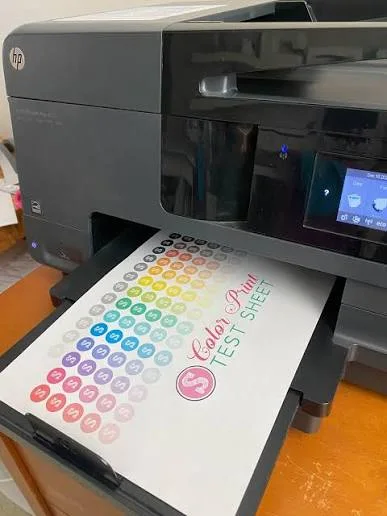
A physical print is the final check that matters to the reader. The upload did not include the exact printer model, paper or quality setting, so those details are not inferred here.
3. A4 and US Letter
The pages are designed to fit common A4 and US Letter workflows. A printed test is not a metrology standard: consumer printer drivers can shrink, expand or clip content depending on margins and scaling. Where exact line width or position matters, compare settings and keep them consistent between before/after prints.
4. Technology-Specific Guidance
Inkjet and laser printers are not diagnosed as if they use the same mechanism. Inkjet guidance discusses nozzles, ink supply and printhead maintenance. Laser guidance discusses toner coverage, imaging/drum behavior, transfer/fusing symptoms and repeating marks. Brand pages further separate families where a manufacturer sells both technologies.
5. Manufacturer Sources
When a page mentions a built-in nozzle check, print-quality report, alignment routine or drum check, we prefer an official manufacturer source and say that menu names vary by model. A browser-generated pattern passes through the application, operating system, driver and printer color/rendering pipeline; it therefore cannot be treated as identical to a manufacturer-generated hardware diagnostic. A general website should not pretend that a single button sequence or one visible symptom proves the same component on every printer in a brand.
Example of a Printer-Generated Diagnostic Pattern
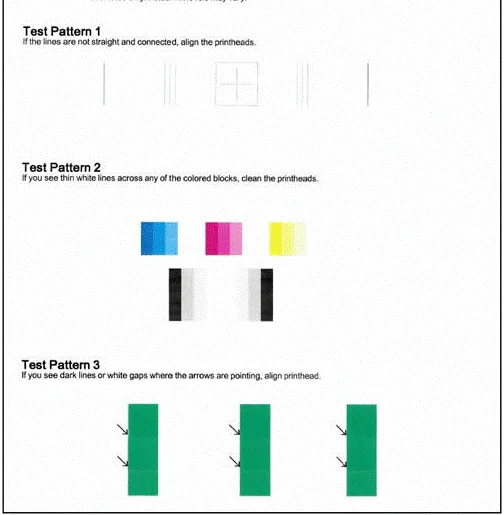
This cropped example shows the kind of model-generated pattern that can be compared with an independent browser test sheet. The identifying printer-information block was excluded from the website copy; exact HP procedures vary by model.
6. What We Do Not Claim
7. Evidence Standard for Physical Examples
When the site publishes a scan, photograph or before/after printer result, the strongest version identifies the printer model, paper, quality mode, browser/OS where relevant, the observed defect and the action taken. Some uploaded examples currently do not include all of that metadata, so their captions state the limitation instead of inventing details. Illustrative patterns and comparison graphics are labeled separately from photographed print examples.
8. Corrections
If a page presents a model-specific instruction too broadly or a pattern behaves incorrectly in a browser/driver combination, use the contact page. Corrections should state what changed rather than silently preserving an inaccurate universal claim.